.png)
A 2025 Gallup and Walton Family Foundation survey of over 2,200 U.S. public school teachers found that 57% of them saw an improvement in the quality of their grading and feedback after using AI for grading papers.
Also, teachers who were using AI weekly saved close to six hours a week on average. Now, imagine that is roughly six weeks over a full school year.
So if you're still deciding, here are the 8 best AI grading tools for academic papers, checked against their own feature pages and their reviews on Trustpilot, G2, and Capterra.
Quick summary
If you’re looking for a dedicated tool designed first and foremost with rubrics in mind that can help you grade essays at scale, EssayGrader has by far the deepest library of rubrics available and natively integrates with your LMS. Or if your goal is to give students instant feedback on how they did, check out Class Companion. And finally, if you're living inside Google Docs 24/7 and all you really need right now is lightweight feedback, go with Brisk.
How We Selected These Tools
For each tool, we looked at three things:
- Features and pricing: Sourced directly from each company's own website
- Independent reviews: From Trustpilot, G2, and reporting by teachers or EdTech outlets like Tech & Learning, TeachersFirst, and Common Sense
- What each tool is actually built for: Is it a rubric-based grading tool, a feedback-and-revision tool, or a browser extension?
Why Listen To Us
We know what a grading tool actually needs to do because we built one, which is also why this list is honest about where a competitor does something better than we do.

This guide comes from the team behind EssayGrader AI, which started when Payton watched his wife struggle with grading papers, and that team now serves 100,000+ teachers every day.
8 Best AI for Grading Papers in 2026
1. EssayGrader AI
Best for: Teachers who grade essays, papers, and other written assignments every week, looking to apply their own rubric consistently.
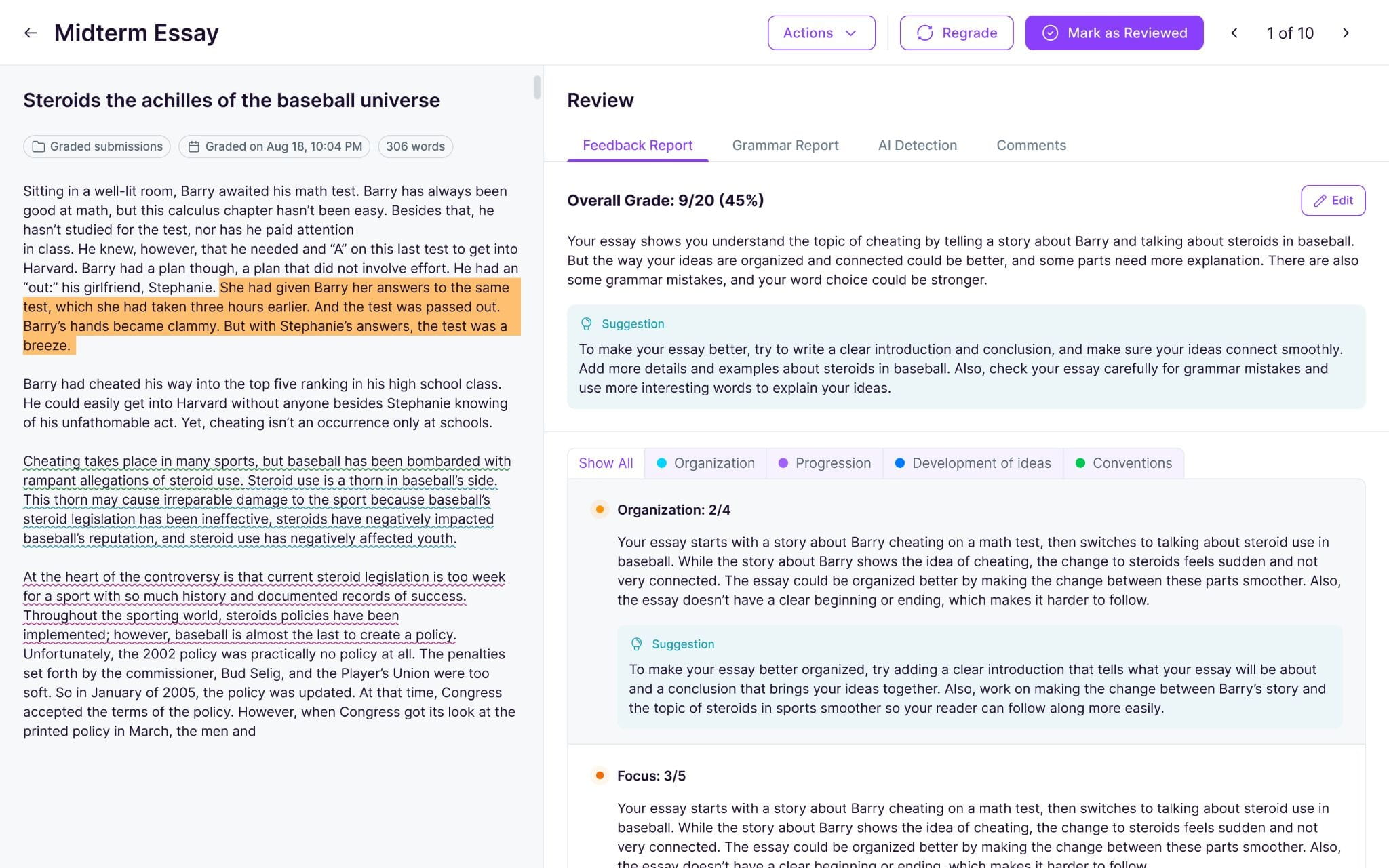
EssayGrader AI is built around written assignments specifically. You upload a class set, apply your grading criteria, and get back scores and comments without reading every paper top to bottom yourself first.
Key Features
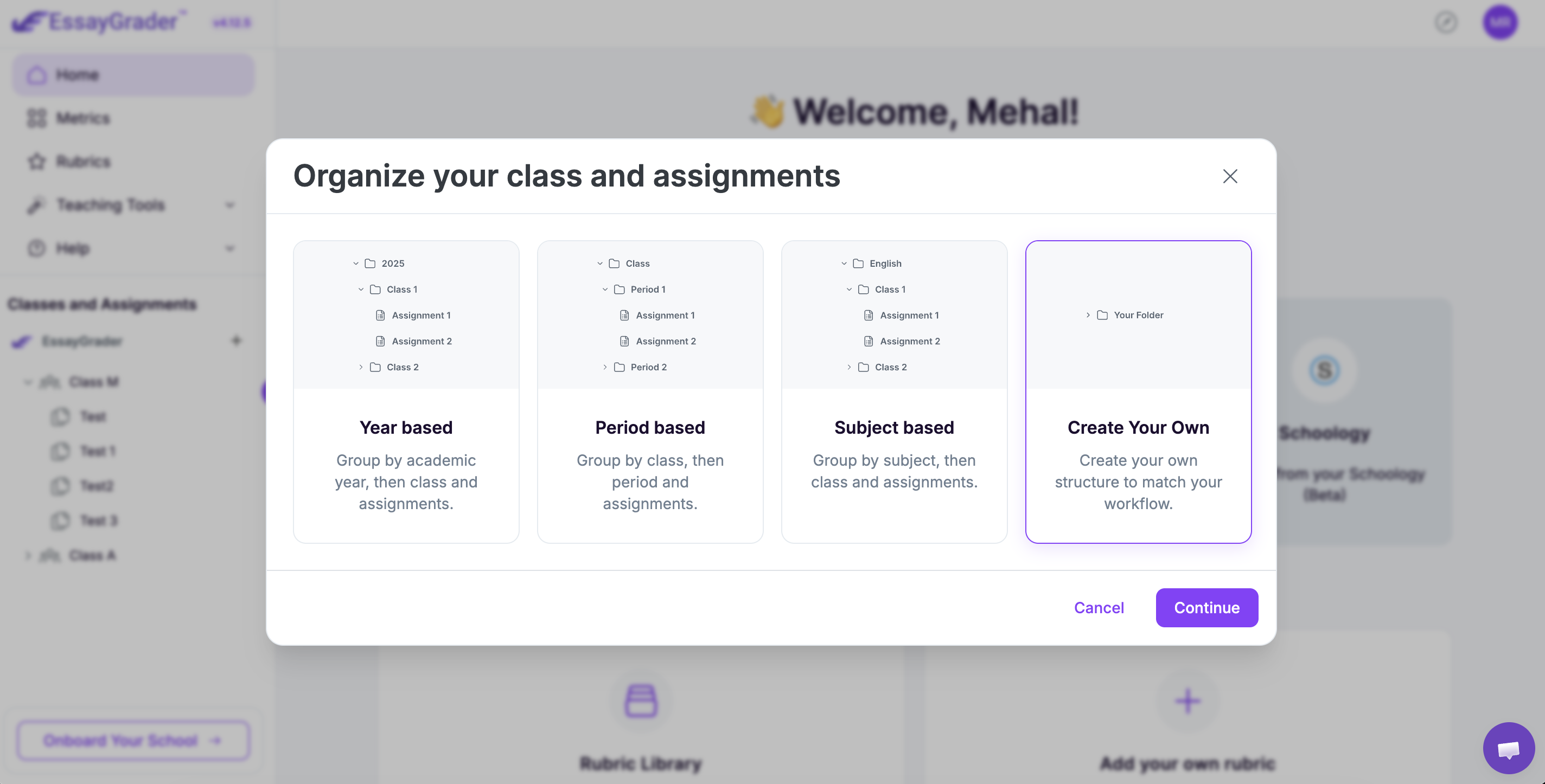
- Over 500 pre-built rubrics: Covering everything from US State Standards, AP/IB, and more, internationally too.
- Bulk-upload: You can bulk upload an entire class set at once instead of grading paper by paper.
- AI and plagiarism detection: Built-in AI writing and plagiarism detection that works right alongside the grading process.
- LMS syncs: Syncs natively to major LMSs like Google Classroom, Canvas, etc, with auto-exported scores.
- Handwriting & multi-language support: Reads papers even if they’re uploaded as photos, and can grade them in multiple languages.
Pricing
With EssayGrader AI, you’ll get:
- Free version: Lets you grade 50 papers monthly under a 1000-word limit
- Pro tier: You pay $14.99/month (annually) to grade 350 essays (3500-word cap/essay)
- Premium tier: At just $34.99/month (annually), you get 800 essays graded on EssayBot.ai (8000-word cap/essay)
- Custom pricing: Schools & Districts have access to custom pricing options based on their licensing needs
What Users Say
With a 4.5/5 rating, Trustpilot reviews show a consistent appreciation for the level of detail & depth of grading once things are set up correctly.

Pros
- Purpose-built for extended writing.
- Strong handwriting recognition capability.
- Good free version before needing to pay anything.
Cons
- 1000 word cap for the free plan is pretty limiting for longer essays.
2. Class Companion
Best for: ELA teachers who want students to revise based on feedback immediately.
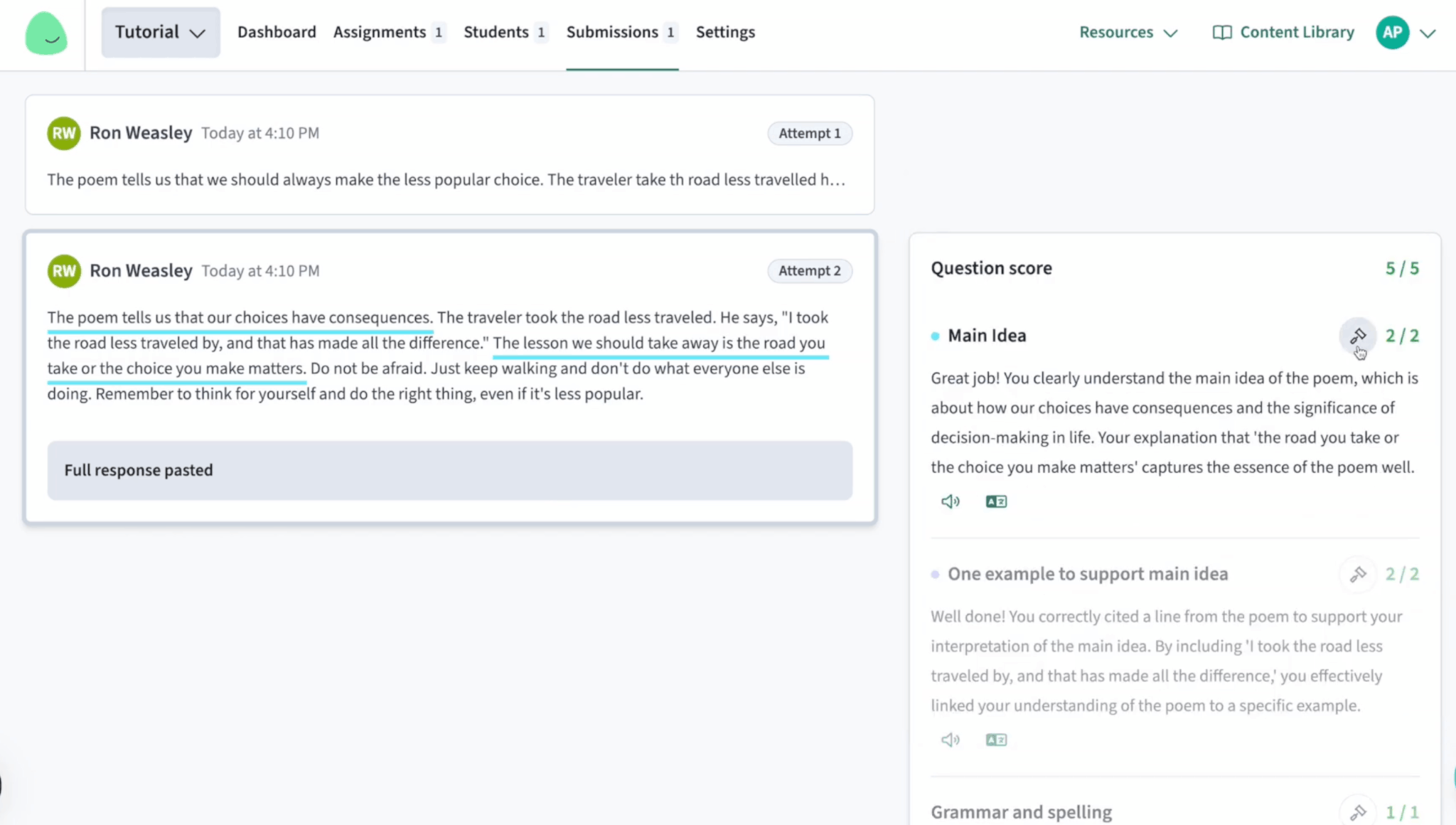
Class Companion offers two main features. It grades student assignments using your rubric, and then provides them with an option to work with Ditto’s AI tutor while they revise the assignment until they’re ready to resubmit.
Key Features
- Instant feedback loop: AI scores and comments arrive before the grade becomes final, giving students time to revise.
- Ditto AI tutor: Students have the chance to ask follow-up questions about their feedback.
- Teacher approval required: No score makes its way to a student without teacher sign-off.
- Handwritten upload support: You can submit photos of handwritten responses and still get your score.
- Analytics dashboard: View trends across a whole classroom or see individual student-level performance all at once.
Pricing
Free base plan available for both teachers and students, whereas school and district plans are quoted.
What Users Say
We couldn’t find any Trustpilot or G2 listings on the tool.
Pros
- Built-in revise and resubmit loop
- Incorporates AI into writing instruction
Cons
- STEM subject coverage is pretty thin
- No built-in AI writing detection
- No reviews on trusted platforms
3. Brisk
Best for: Teachers who grade within Google Docs or Classroom without wanting to keep an additional tab open.
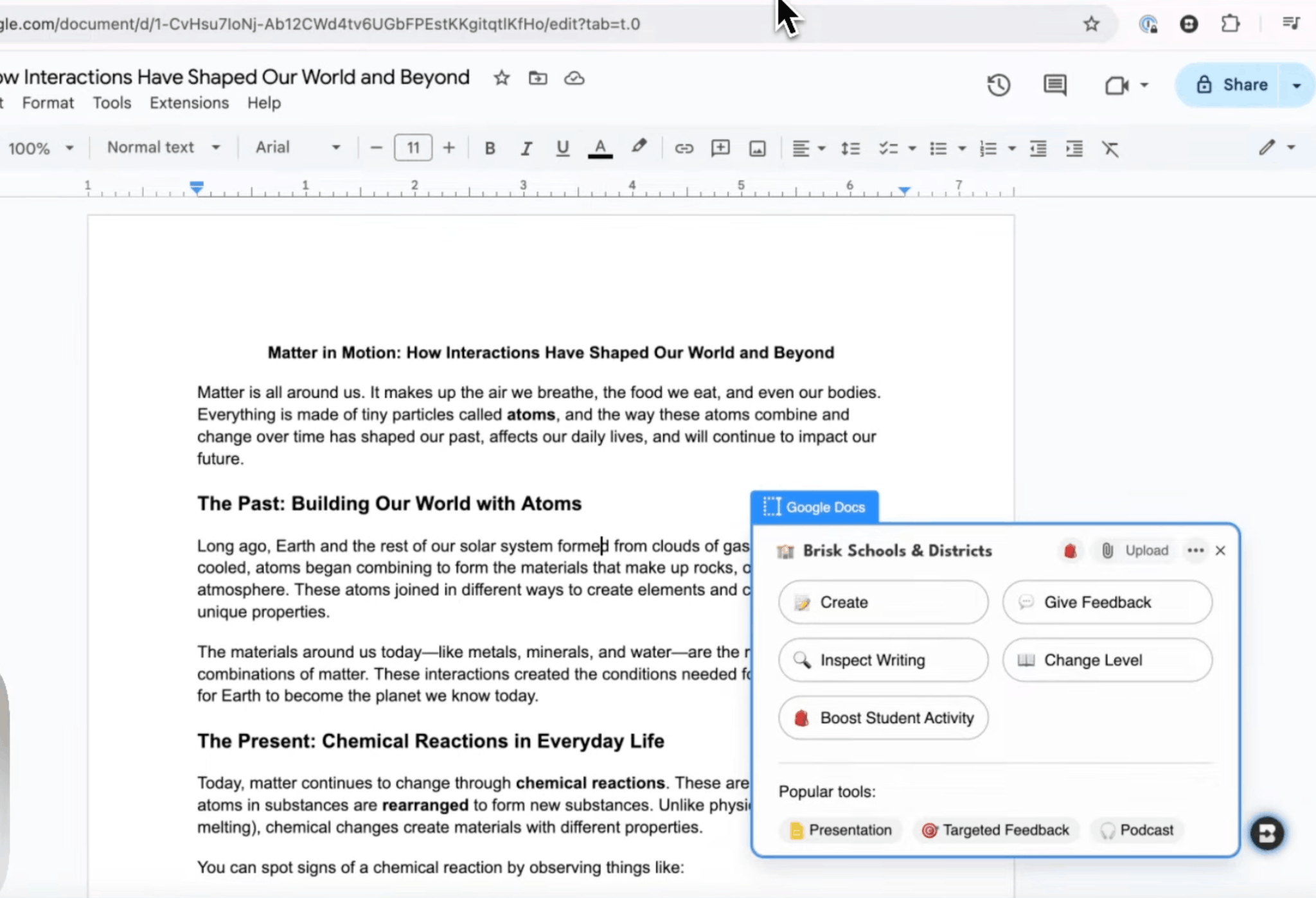
Brisk functions as both a Chrome and an Edge browser extension. Once installed, you’ll be able to provide feedback within the same doc that your students wrote their work in. This includes newly available “rubric-based grading” that’s synced into Google Classroom as well.
Key Features
- Rubric-based scoring: With comment suggestions synced to Google Classroom through the ‘Brisk grader’ feature.
- Writing history: You can inspect your student’s edit history and flag patterns of AI-assisted work on their side.
- Four feedback styles: From which you can pick, including “targeted comments” or “glow & grow”, based on your assignment needs.
- Support: Provides cross-platform support in Google Docs, Slides, Forms, and now even Microsoft Edge.
Pricing
Free forever + custom pricing available for schools & districts.
What Users Say
There is no unified score yet on Trustpilot or G2 that would allow us to determine Brisk’s overall credibility, but an independent review on Reddit calls it excellent when it comes to providing in-document feedback.

Pros
- A full free forever tier
- Zero changes to an existing Google Docs workflow
Cons
- Full rubric grading isn’t as established a feature as some of Brisk’s formative feedback tools
4. Writable (by HMH)
Best for: Grades 3–12 schools and K-12 writing programs where you’d love to integrate AI grading with your full curriculum.
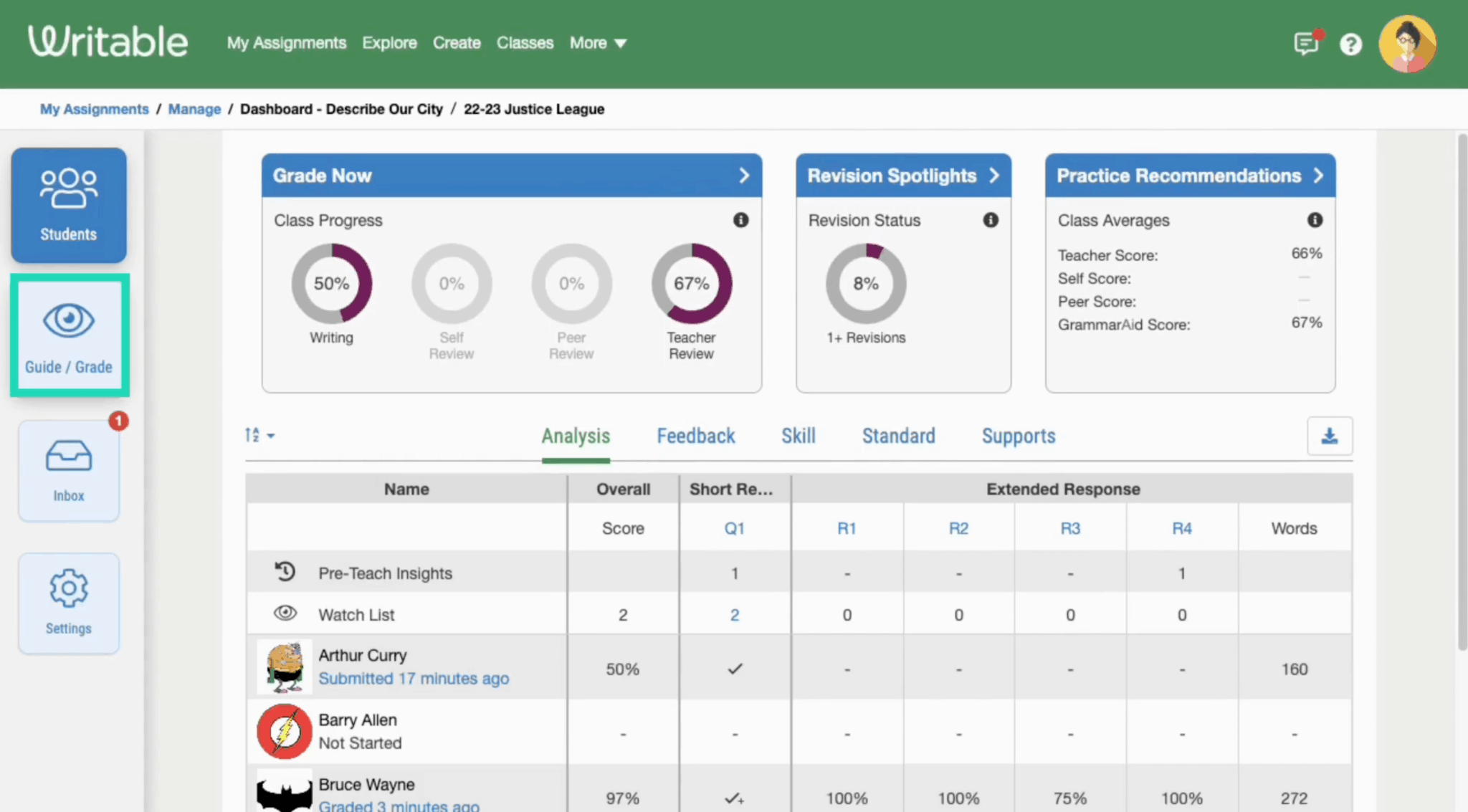
Writable gives students a great way to practice their writing skills while offering educators real-time insights on how well they are doing.
Its AI assistant provides suggestions about scores along with helpful revision and grammar tips (called RevisionAid and GrammarAid). And all the tools are backed with a huge library of standards-aligned writing prompts.
Key Features
- GradeAssist: Scores your paper using its AI assistant’s suggestions, then uses RevisionAid & GrammarAid for personalized, student-facing feedback.
- Originality check: Writable has partnered directly with Turnitin so they can license its plagiarism-checking service.
- Assignment library: With over 1,000+ customizable assignments, prompts, and rubrics at our disposal, there will be no shortage of things for your class to write.
- Two-way LMS sync: Integrate with Google Classroom, Schoology, Canvas, or even Microsoft Teams.
- Multilingual support: If your students speak more than one language, Writable also offers them feedback written in other languages.
Pricing
Per year, with custom quotes.
What Users Say
Common Sense Education gave Writable a 4/5 rating, giving it a perfect 5/5 pedagogy score! However, this independent review program has temporarily paused publishing reviews as of January 2026.
Pros
- Great curriculum alignment makes integrating this tool easy for teachers
- Dedicated customer success support
Cons
- At just $9 per student annually, the cost can add up quickly
5. Gradescope (by Turnitin)
Best for: University departments looking to grade exams (written responses), code, or handwritten problem sets at scale.
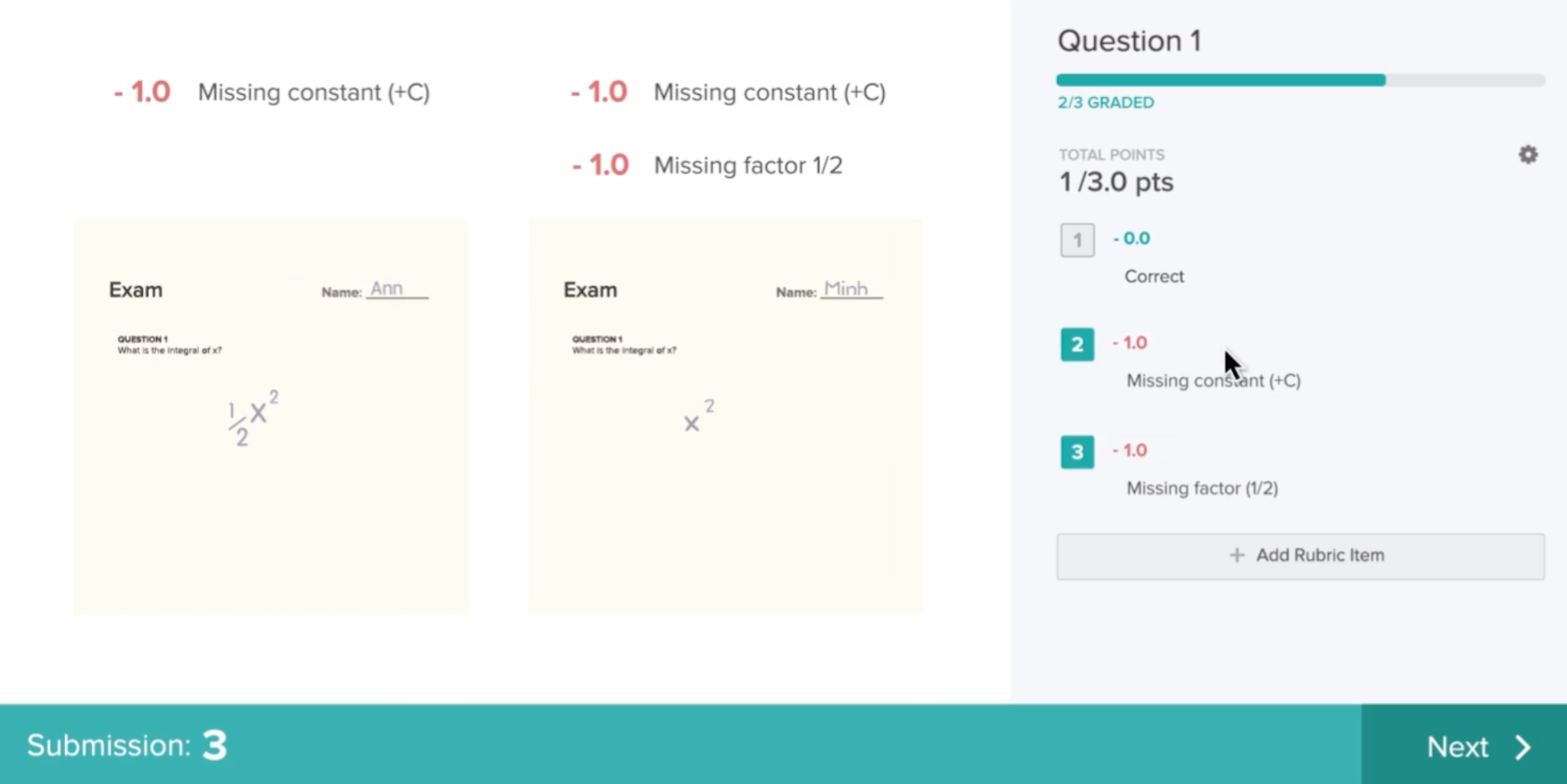
With Gradescope, you can cluster similar student answers together. A single answer that’s been graded will then be applied to all others deemed “similar”, making it a unique feature.
Key Feature
- Answer clustering: This covers all manually grouped, multiple-choice, math fill-in-the-blank, and text fill-in-the-blank questions.
- Native handwriting and code support: It works well on scanned handwriting as well as bubble sheets and programming assignments.
- Anonymous grading: Student identities are kept private while scores are assigned, helping prevent bias in evaluations.
- Student-initiated regrades: Students request a regrade right within their system instead of sending emails around.
Pricing
Custom pricing through the Turnitin sales team with no published rates.
What Users Say
Capterra reviews rate it 4.6/5 based on 6 reviews, although much is not available.

Pros
- Strongest support for both STEM and mixed-format courses
- Quite a well-known name in the grading space
Cons
- Pricing requires a sales call
- Setup requires IT involvement
- Not built around free-form essay feedback the way EssayGrader or Class Companion are
6. Edcafe AI
Best for: Teachers looking to use an assignment grader within their larger lesson planning toolkit.
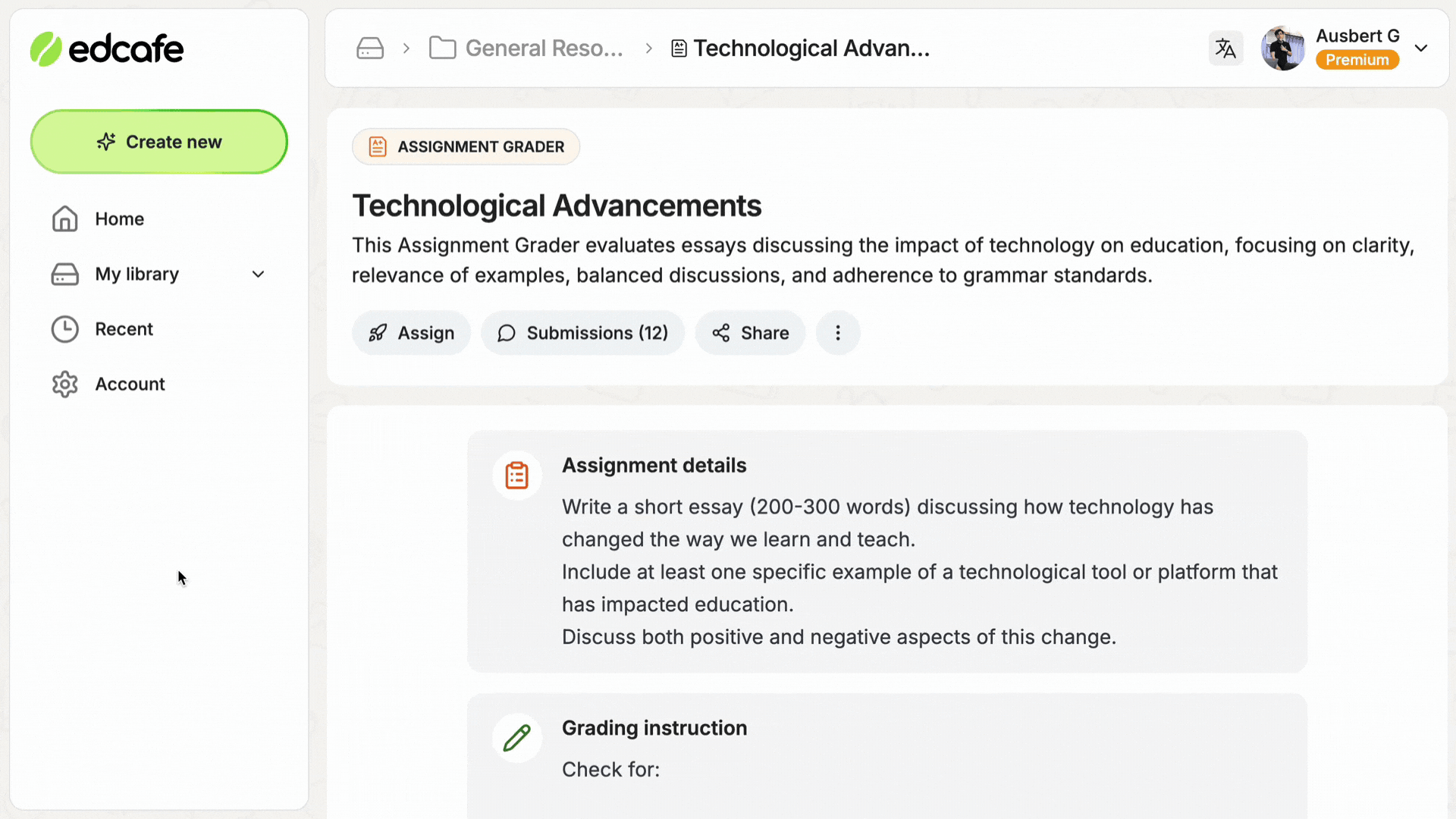
The Assignment Grader in Edcafe allows users to upload a rubric, share out assignments through a QR code or link, and receive editable AI feedback. The platform includes tools to help teachers create lesson plans, quizzes, and slides as well.
Key Features
- Rubric-based grading: With AI feedback that can be edited before being shared with a student.
- Easy sharing: QR code & link sharing, where students don’t have to have an account to submit work.
- Exportable records: You can save and export all the assignments given and received, along with feedback and grades.
- Live analytics: A dashboard tracking student performance over time.
Pricing
The free version provides 100 generations per month and 3 graders, while the Pro edition costs $7.99/month billed annually and comes with 1,000 generations and 20 graders. The premium version at $14.99/month, billed annually, has no limits on usage.
What Users Say
There are some reviews available, but there isn’t much specifically related to the grading function.
Pros
- Low entry price
- Great for teachers just starting out who might not need an enterprise-level solution yet
- Useful if your goal isn’t solely focused on grading, but you still want to use this kind of technology
Cons
- Grading is just one of many functions in this application, which could leave you feeling like you’re missing something if your main priority was grading.
7. GPTZero AI Grader
Best For: Teachers who need both AI detection and rubric grading.

With its “AI Reviewer,” teachers get rubric-based grading along with feedback about content, clarity, and structure. There is also “writing replay” that shows students’ entire editing process in video style right within their Google Docs file.
You can review citations and see if there are places where they missed some key sources, and then give direct grades via LMS such as Google Classroom, Canvas, or Moodle.
Key Features:
- AI Reviewer: Rubric-based grading with comments on content, clarity, and structure
- Writing Replay: Video-style playback of a student's editing history inside Google Docs
- Citation check: Flags missing or unsupported sources in an essay
- Direct LMS grading: Works through Google Classroom, Canvas, Blackboard, or Moodle
- Compliance: SOC 2, FERPA, and GDPR-aligned data handling
Pricing
Free trial is available, and individual plans run roughly $23.99 to $45.99/month, depending on billing cycle, with separate classroom and API pricing.
What Users Say
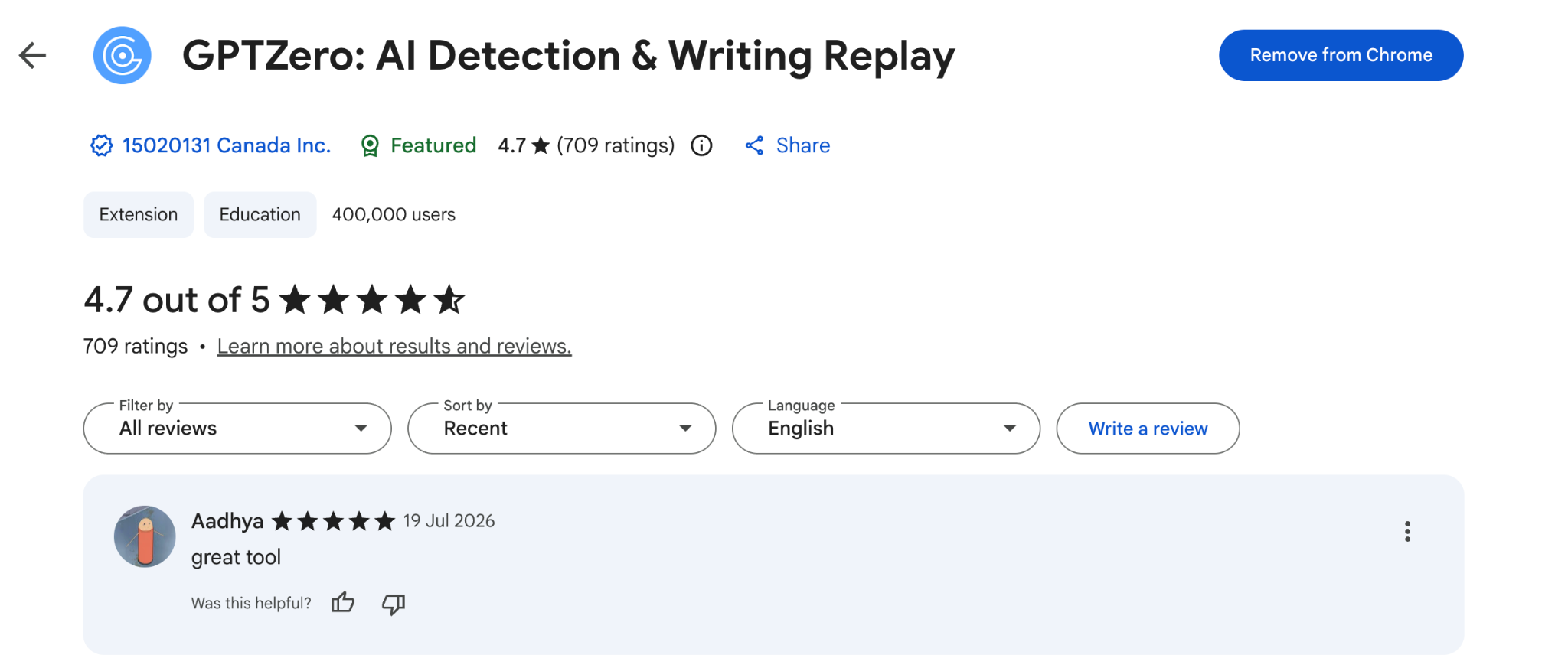
Its Chrome extension holds 4.7/5 from 709 reviews, but that is for their primary AI detection tool, not for the AI grader itself.
Pros
- Expert-trained templates produce feedback that doesn't feel generic
- Pairs grading with top-tier AI detection in one place
- Scores and comments are editable, so you keep the final call
Cons
- Less developed writing quality feedback features
8. Marking.ai
Best for: High school teachers marking long, handwritten essays using a mark scheme.
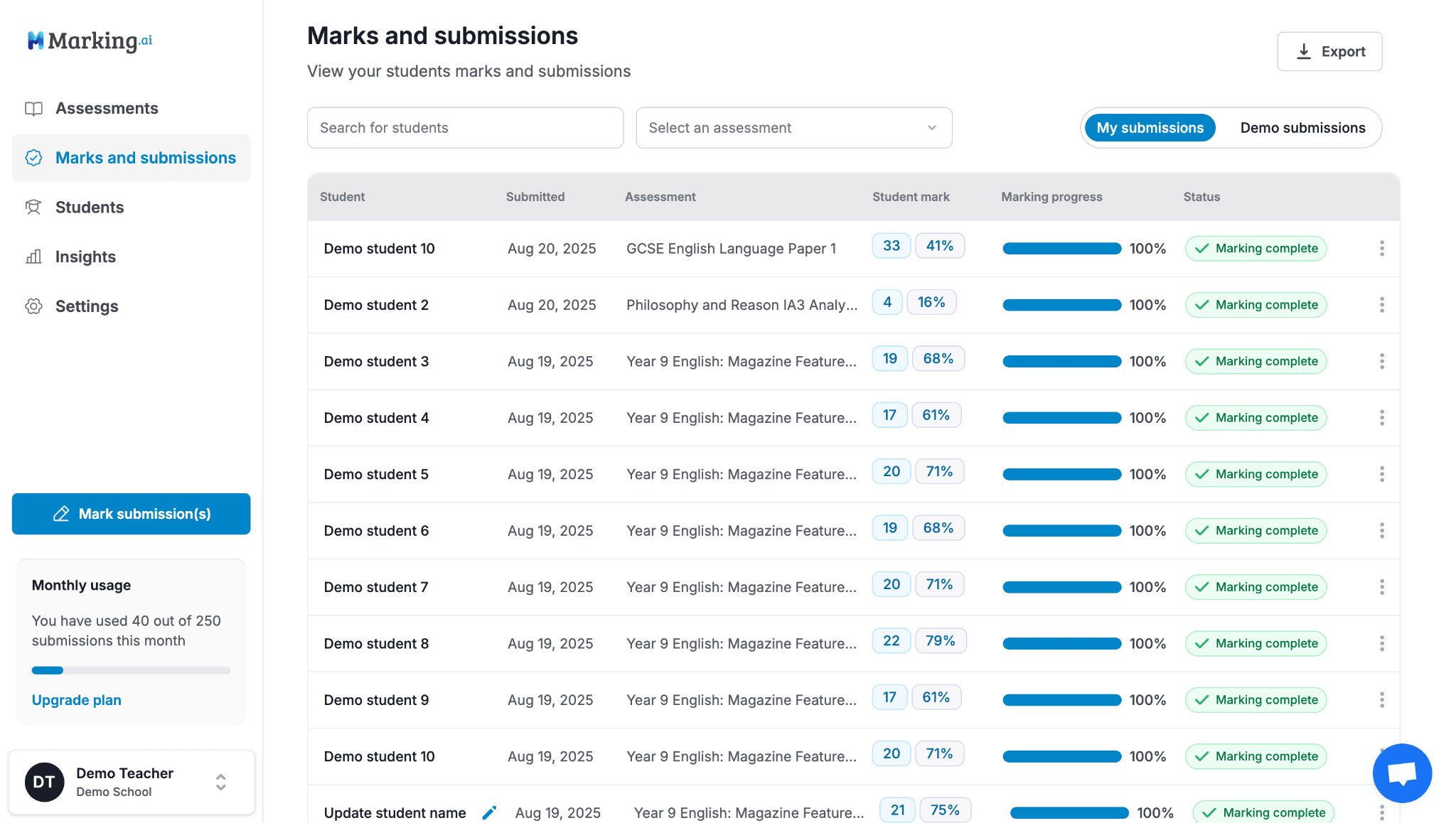
Instead of marking the whole essay, this tool grades question by question. Marking.ai can even read handwritten script and then match it up against your rubric. You’ll get detailed feedback on each question on how your students did. Plus, you’ll be able to change all their scores before they’re handed off, too.
This tool is great if you don’t feel comfortable just handing over everything to an algorithm. This way, you’ll still have control over each piece of feedback.
Key Features
- Detailed feedback: Question-level marking with detailed per-question feedback
- Scans text: Strong handwriting recognition (even if it looks messy)
- Built-in AI teaching assistant: Lets you ask follow-up questions during reviews
- Editable feedback: Full control over the scores and feedback you give before handing out anything
Pricing
Uses tiers depending on the number of assessments or students.
What Users Say
There isn’t a Trustpilot, G2, or Capterra profile here with substantial user reviews right now. However, testimonials featured on their website say marking.ai works well.
Pros
- Handwriting recognition is pretty good
- Detailed at the question level
Cons
- Need to reach out to figure out the pricing structure
- Not enough independent content has been reviewed yet
Which One Should You Choose?
For teachers who spend most of their time grading written assignments, EssayGrader is the ideal pick, letting you grade essays quickly and apply your rubric in a way that actually holds up across a full class set.
Over 100,000 teachers already use it to turn hours of grading into minutes without changing how they teach.
Try EssayGrader free and see how much easier your life gets
FAQs
- What is the best AI for grading papers?
The ‘best’ AI really depends on what you’re grading. If you need to evaluate essays and written assignments with custom rubrics, EssayGrader AI has the most controls while maintaining excellent accuracy through its use of a large dataset of human-graded work.
- How accurate is an AI paper grader?
It goes without saying that your rubric will influence how accurate these tools are. According to a 2025 study by the University of Georgia, “the accuracy of AI grading was only 33.5% when no rubric was provided. When teachers explicitly provided detailed criteria, accuracy rose to above 50%.”
- Will AI grading tools replace teachers?
An AI grading tool cannot replace teachers. All these tools require some sort of control, at least before handing out a score to a student.
- Are these tools compliant with student data privacy laws?
Most tools like EssayGrader AI are compliant with FERPA and COPPA. Still, as a precautionary measure, before you upload anything to one of them, double-check that your school or district has a signed Data Privacy Agreement in place.

.jpeg)


.avif)
.avif)
%201.svg)