.png)
It is not humanly possible for a teacher who is grading 100 essays to do the same intellectual work 100 times over.
That repetition is one of the reasons why educators have started looking at AI grading tools for teachers as a way to support them.
In fact, a 2025 study of teachers using AI-generated feedback showed that they actually valued the speed of these tools but still wanted to review and control the assessment process themselves.
The appeal here was to spend less time on repetitive marking and more time on deciding what your student actually needed to improve.
So if you’re still contemplating, here are the 7 best AI grading tools that you can choose from according to your needs.
Quick Summary
Our top picks are EssayGrader AI, Gradescope, and Brisk. EssayGrader AI is the strongest fit for teachers who mainly grade essays and want rubric-based scoring, feedback, and integrations with common classroom platforms. Gradescope is better suited to large classes and mixed-format assessments, while Brisk is great for in-document feedback.
How We Selected These Tools
Every tool that made it to our list was measured against this set of questions as a prerequisite:
- Can teachers use their own rubric?
- Can they review and change the result?
- Does the platform work with the tool you already use?
- How does it handle essays, handwritten work, maths, or mixed assignments?
We also considered pricing, privacy claims, integrations, and how useful each AI grading tool is. Where possible, we verified official product documentation alongside public reviews and teacher discussions to bring you unbiased comparisons.
Why Listen To Us
We have hands-on experience in this field. EssayGraderAI was the brainchild of Payton. He came up with this idea after watching his wife, Ashley, an English teacher with over a decade in the classroom, being buried under an unmanageable grading load.
CEO and founder Chan brought more than 10 years of product marketing and teaching experience to build this platform itself. That combination now serves 100,000 teachers every day, and the article draws on that experience and independent research into every tool covered here.
7 Best AI Grading Tools for Teachers
1. EssayGrader AI
Best for: It’s perfect for teachers who need to grade a plethora of essays against their own rubrics and have a sense of control.

EssayGrader AI is designed around written assignments. It lets you, as a teacher, upload submitted assignments, apply your grading criteria, and receive grades and feedback without having to manually go through each and every essay.
You can use this platform to grade essays, research papers, DBQs, short answers, and other forms of extended writing for any subject.
And the plus point is that the AI grading provided by EssayGrader AI remains reviewable. It allows teachers to check and adjust feedback before returning it to students.
Key Features
- Pre-built and custom rubric scoring: Comes with over 500+ rubrics covering all US states and allows you to create your own rubric as well
- Native LMS sync: With the integration of Canvas, Google Classroom, Schoology, and Open edX, you can easily import assignments, get them graded with your custom rubric, and sync back scores without any manual work.
- Built-in AI and plagiarism detection: These features are built in and included in the same grading pass, and save you time from running every assignment on different tools.
- Bulk class upload: You can grade an entire class set in one batch, though it comes with the premium tier and above.
- Editable feedback: Every comment by EssayGrader can be edited and rewritten or even deleted before a student sees it.
- Privacy-first data handling: This means no student names, emails, or IDs are saved; they are encrypted in transit and deletable anytime.
Pricing
It comes with a free version where you can grade 50 essays a month at a 1000-word limit. Other than that, the following tiers are priced at:
- Pro: $14.99/month (annually) for 350 essays and a 3500-word cap per essay
- Premium: $34.99/month (annually) for 800 essays and an 8000-word cap per essay
- Custom pricing: This model is available for schools and districts with licensing options.
What Users Say
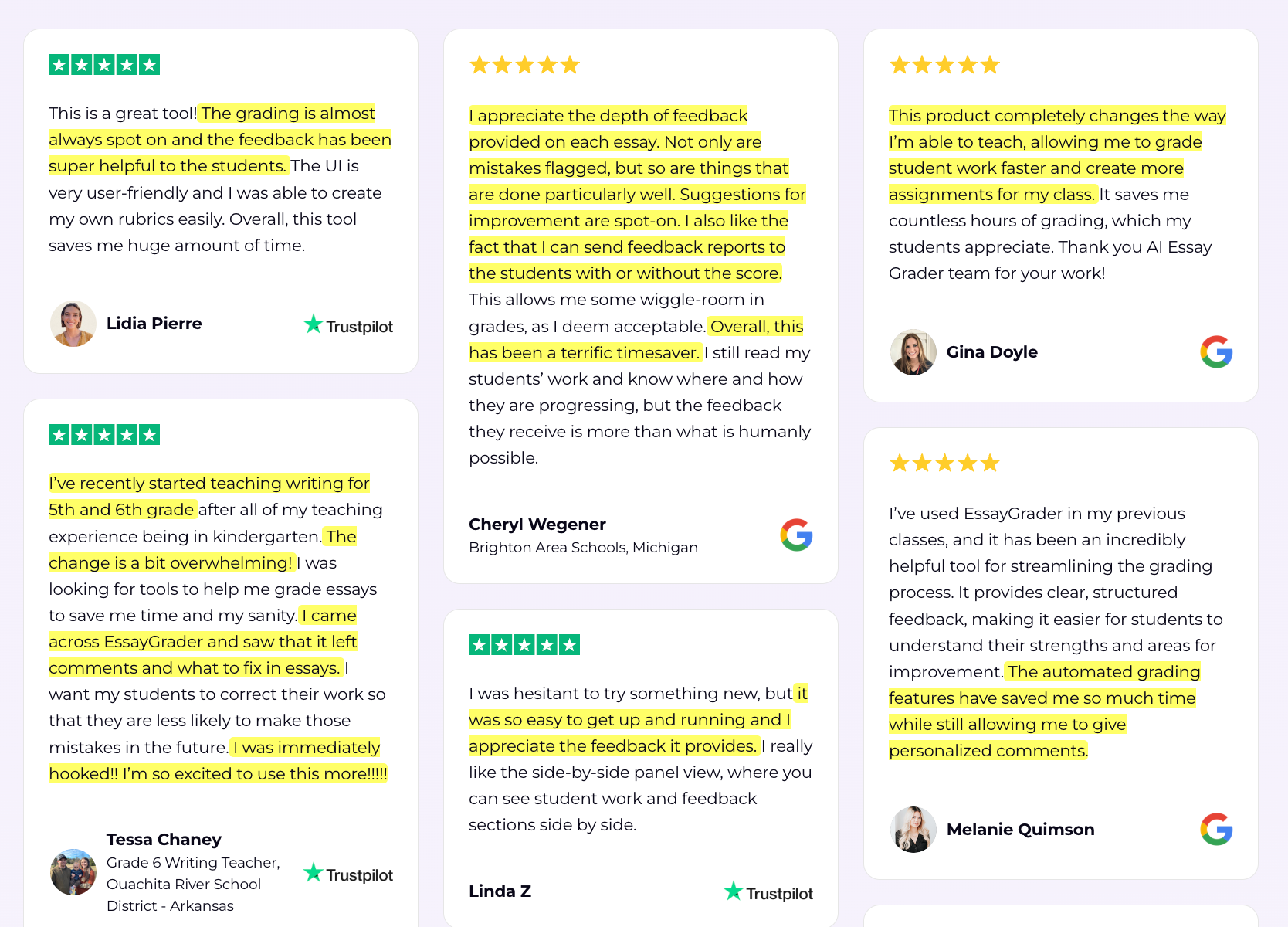
Trustpilot reviews praise how EssayGrader gives detailed writing feedback once a rubric is properly set up, with fast and responsive support.
It has a solid 4.5/5 rating on Trustpilot and 4.8/5 on Google Reviews as well.

Pros
- Purpose-built for extended writing and essay grading
- Reads handwritten assignments as well as photos captured through your camera
- Reduces your manual work
- Detects plagiarism and AI content as a standard
- You can use the free version until you are satisfied to commit to long-term
- Works smoothly across all 50 US states
Cons
- The free plan has a 1000-word limit per essay
- No MLA or APA citation checks are available as of now
2. Gradescope (by Turnitin)
Best for: Works well for large classes, STEM courses, and assessments involving maths, code, handwritten work, bubble sheets, and mixed question types.
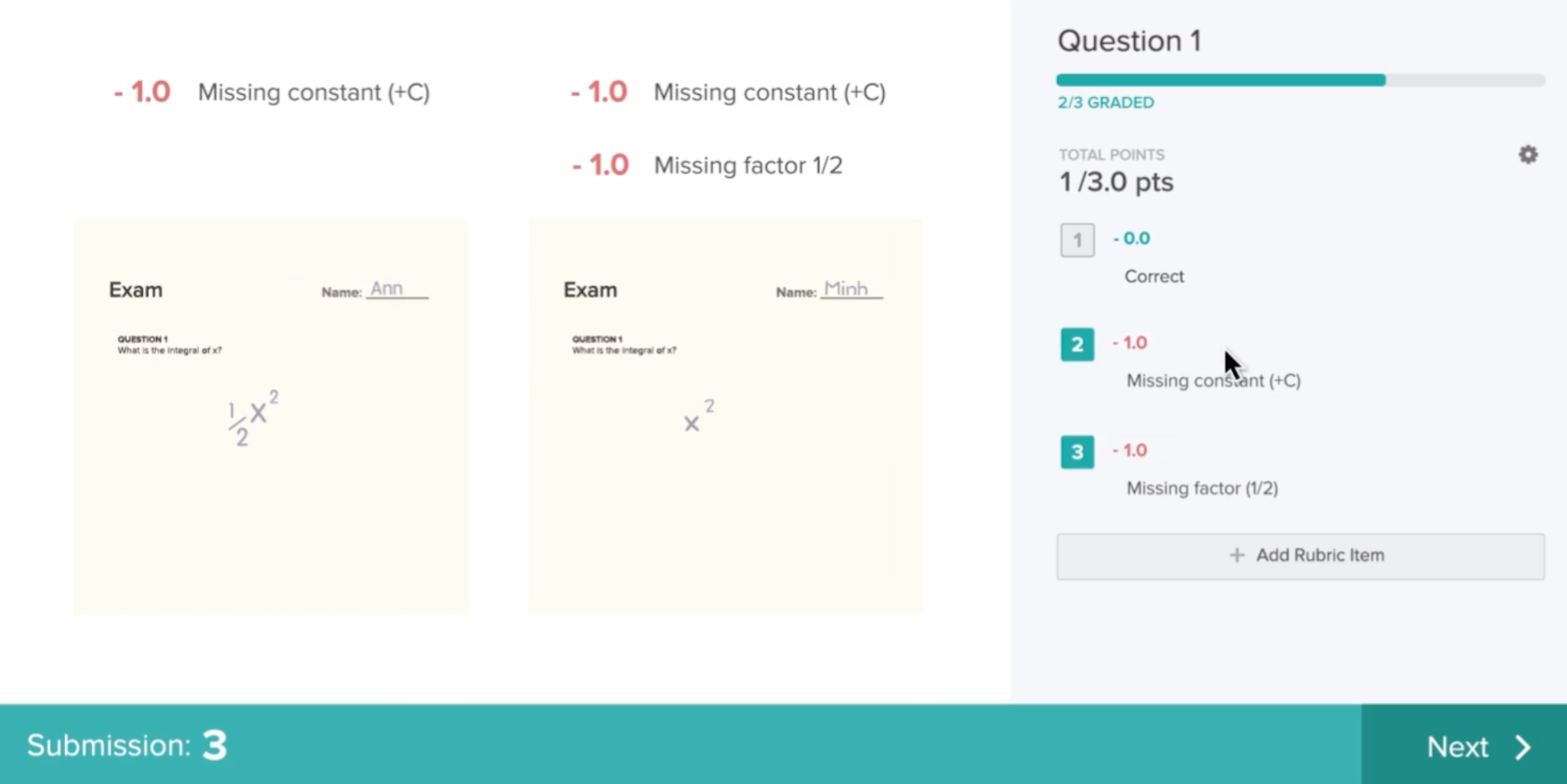
Gradescope, owned by Turnitin, takes an entirely different approach to AI grading with cluster-based feedback. It clusters similar student answers together so you can grade one response per cluster. And it applies across every matching submission at once.
If you’re grading STEM courses, then this tool handles codes, bubble sheets, and even scanned handwritten assignments, making it the strongest candidate for math and science-heavy subjects.
Key Features
- Cluster-based feedback: This is a feature of this tool where one graded answer applies to every similar submission.
- Built for STEM: Its ability to grade bubble sheets, codes, scanned handwritten and programming assignments makes it a valuable AI grading software for STEM.
- Student-initiated regrades: Students can directly submit regrade requests through Gradescope without emailing back and forth.
- LMS sync: Like EssayGrader, this tool also provides integration to major LMS platforms to pull rosters automatically.
Pricing
Gradescope is a quote-based platform through Turitin’s sales team with two-tier plans (Basic and Institutional). There are no fixed published prices or universal rates.
What Users Say
This tool is 4.6/5 on Capterra. Public reviews are mostly positive around speed and volume, but they also flag it as being too overwhelming for new users and difficult to set up.

Pros
- Handles all subjects with ease
- Supports assignments in all formats (PDF, PNG, JPG, etc.)
- Known for cluster-based answers
- Backed by Turnitin's institutional credibility and existing integrity tools
- Strong fit for university departments and institutional workflows
Cons
- Hard to buy as an individual K-12 teacher outside an institutional contract
- Difficult to set up as it needs some IT involvement
- Pricing is not transparent
3. Brisk
Best for: Teachers who want in-context feedback inside Google Docs and Classroom without leaving the browser.

Brisk is basically a Chrome and Edge extension that helps you give feedback to students individually or at scale. It sits directly into Google Docs, Slides, Forms, and Google Classroom, so you can highlight writing and give feedback by leaving comments.
The core strength of Brisk has always been feedback, writing analysis, reading-level adjustment, and inspect writing (not AI detection) all in one. Its newer feature, Brisk Grader, also allows you to add rubric-based scoring inside Google Classroom as well.
Key Features
- 30+ tools in one extension: Lesson plans, quiz generation, translation, and slide drafts are all available in just one Chrome extension
- Inspects writing: Brisk review of a document’s edit history to flag content that looks AI-generated and replays how a student actually wrote it.
- Brisk Grader: It's a new rubric-based addition that allows you to grade in Google Classroom.
- In-document feedback: It’s an extension, not a separate tool, which gives a non-technical teacher flexibility to give feedback and grades.
Pricing
Brisk offers a free version for teachers where they never have to pay, but it comes with limited options. Whereas there are custom prices for schools and districts on Premium and Intelligence tiers.
What Users Say
Brisk has mostly good reviews for its Chrome extension.

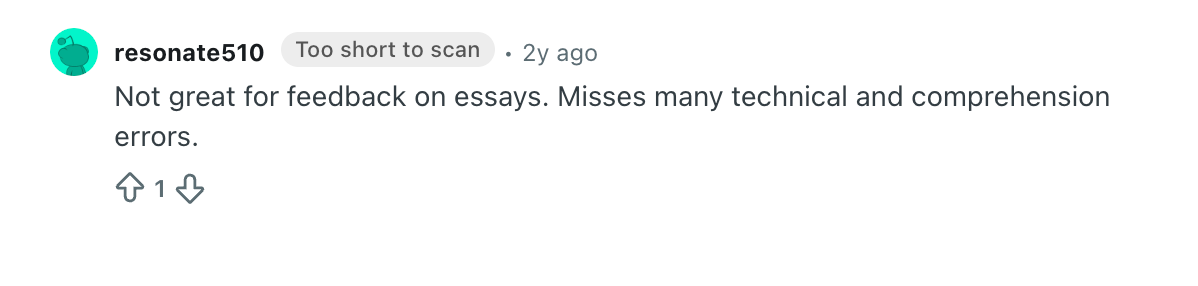
However, some users on Reddit point out that the feedback still needs checking, particularly when the assignment includes detailed instructions or context that the AI has not interpreted correctly.
Pros
- Free for individual educators
- Easy to introduce into existing workflows
- Strong for formative feedback
- Useful for teachers who want more than a grading-only tool
- School and district options available
Cons
- Not a full replacement for dedicated rubric-based grading software
- AI feedback still requires teacher review
- Some advanced features are reserved for school and district plans
- Teachers looking for automated scoring may need a different tool
4. Marking.ai
Best for: K-12 teachers who need to grade assignments question-by-question from scanned submissions.
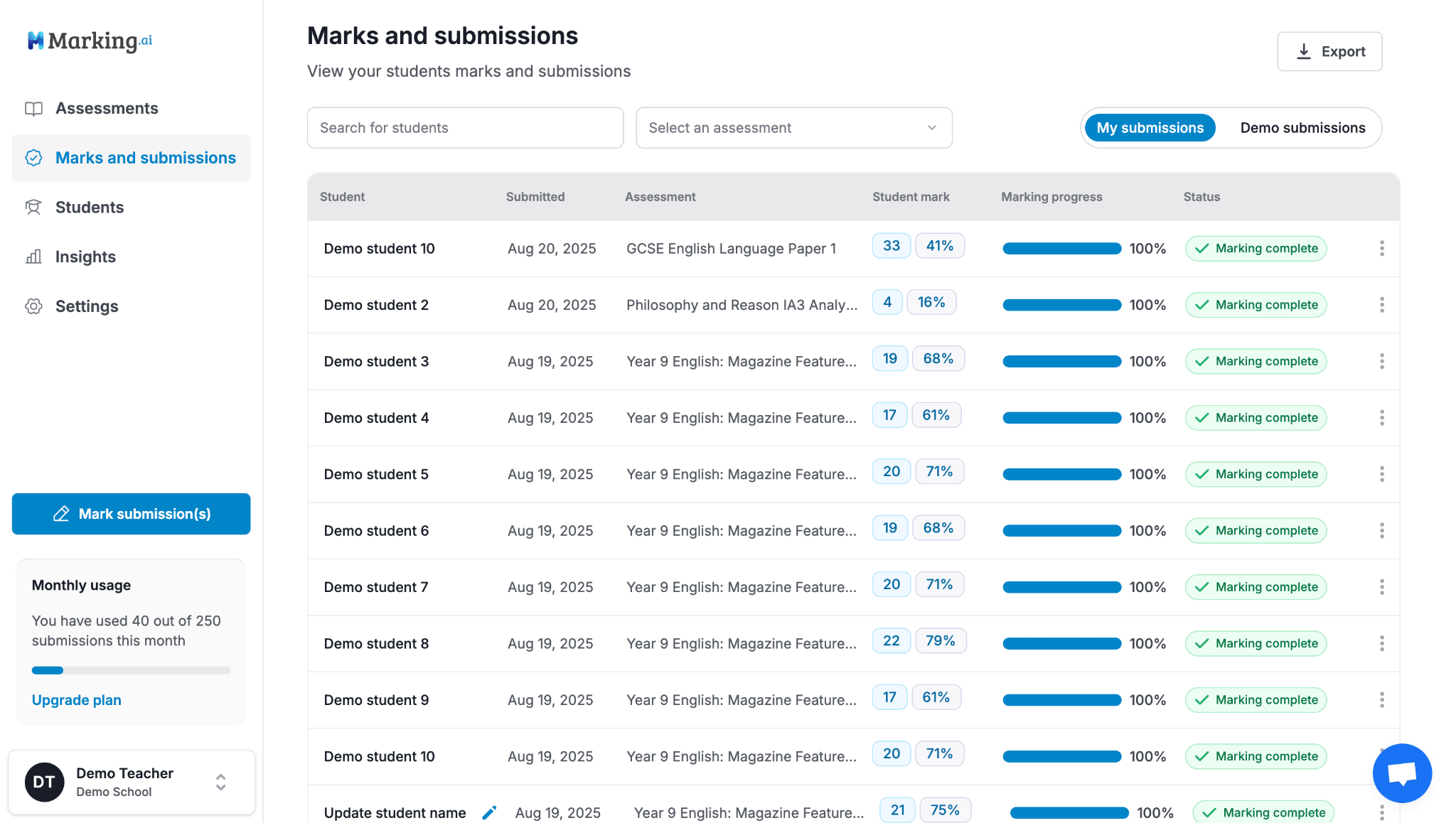
Marking.ai is well-suited to grade high school assignments. It is specifically built around scoring your students’ work at an individual-question level and can read even through messy handwriting.
It’s a suitable tool for teachers as it can create or select assignments, upload submissions directly, and then mark each question separately. Marking.ai also has a built-in AI assistant that lets you ask follow-up questions, and on top of that, you can edit every score if you want to.
Key Features
- Question-by-question marking: It grades and comments per question with detailed feedback depending on how you set the rubric.
- Performance analytics: Allows you to see trends class-wide and even for individual students, so you know where the weak points are to work on.
- Full teacher control: You will be in control of every mark and comment before the results reach students.
- In-platform assignment creation: Lets you create assignments and mark schemes directly in the platform.
Pricing
There is no free trial, and the prices go up with 4 tiers starting from $29/month for roughly 90 submissions. Also provides a top-up option for $12.
What Users Say
Marking.ai has no substantial presence or reviews on G2, Capterra, or Trustpilot. Given the limited review volume, testing it before committing is a safer option.
Pros
- Provides question-level evaluation and feedback
- Can read all forms of documents, including handwritten assignments
- Suited for K-12 teachers who need to create or grade submissions
Cons
- No free tier or trial is available
- Thin independent review coverage
- Expensive for teachers grading high submission volumes
5. GPTZero AI Grader (AI Reviewer)
Best for: Teachers who want to grade students while checking whether the submissions are AI-generated.

GPTZero has made its name as an AI-content detector, and now its educator’s tool extends to grading and feedback as well. When you submit assignments to GPTZero, it gets checked for AI-generated content and plagiarism as a standard part of the process.
For maximum efficiency, teachers can calibrate AI Reviewer by grading some assignments manually so it learns your unique scoring style and applies it to other submissions.
Key Features
- Calibration by example: You can teach GPTZero’s AI grader/reviewer your grading style by doing a few yourself, and it will replicate your style for all other submissions.
- Built-in AI-detection: Every submission automatically runs for AI and plagiarism detection without any manual input.
- Mechanics-level feedback: You’ll see comments on grammar, spelling, citation formatting, and even on quote use.
- Direct LMS grading: You don’t need to download a separate platform, as it allows teachers to grade through Google Classroom, Canvas, Blackboard, or Moodle.
- Privacy controls: It runs on GPTZero’s existing FERPA-, SOC2-, and GDPR-aligned systems.
Pricing
The first few tries are free only, and the paid tiers are priced at:
- Premium: $23.99/month
- Professional: $45.99/month
- Custom: For schools and districts
What Users Say
While GPTZero’s AI grading tool is one of the first tools in the market, its AI grader or AI reviewer was just launched in March 2026. So there aren’t many reviews of GPTZero’s AI grader as such.
Pros
- It has pre-built grading templates created by domain experts
- You can calibrate by example and personalize your grading experience
- Backed by a large-scale and well-established detection infrastructure.
Cons
- Pricing is word-limited and is not very budget-friendly for individual teachers
- Newer launch with not much data
- Grading feedback on pure writing quality is less developed
6. Class Companion
Best for: ELA and test-prep teachers who want to give feedback instantly.
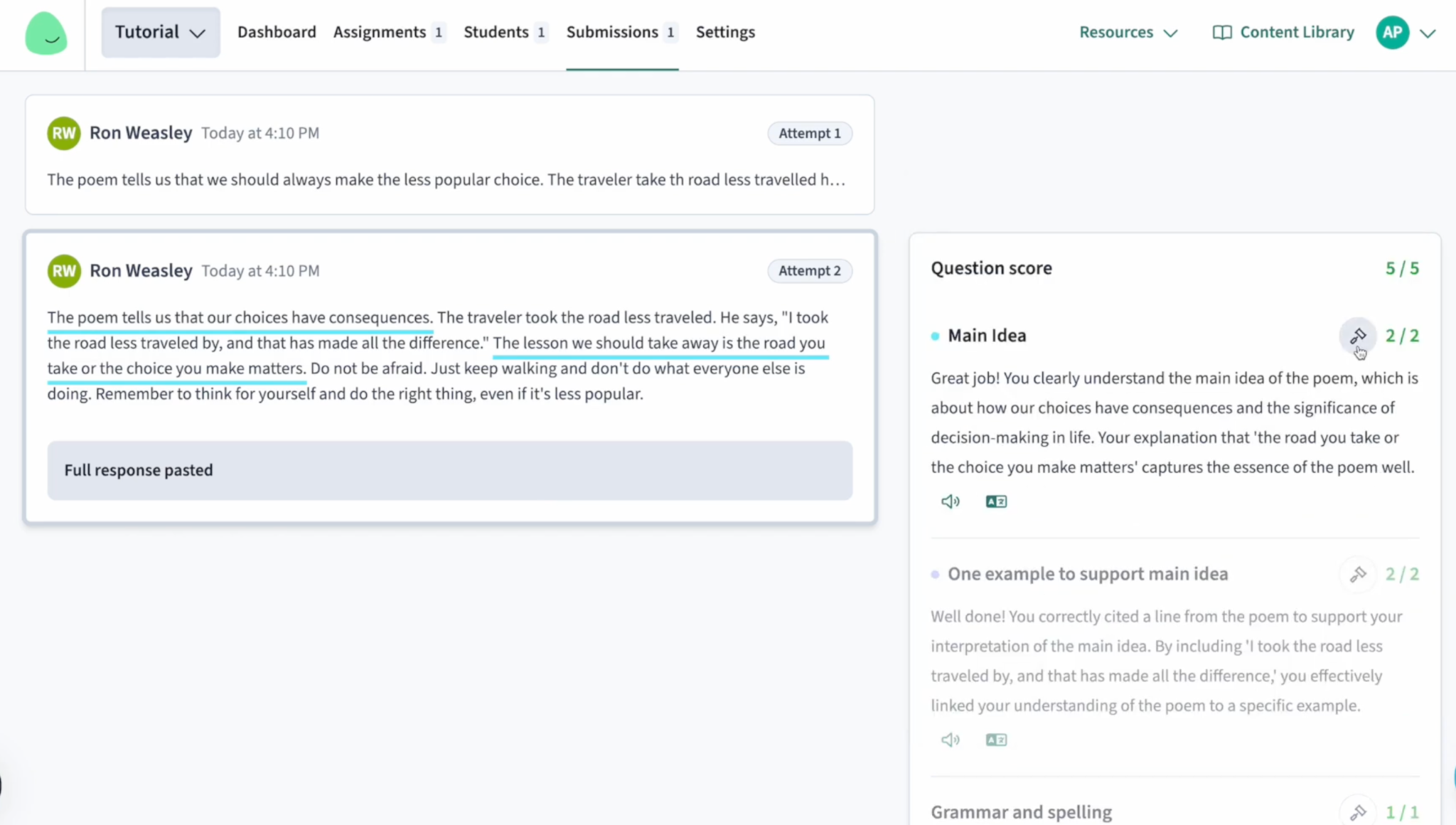
Class Companion is built around a revise-and-resubmit workflow, where a student gets instant, scored feedback the moment they submit a draft. This gives them room to improve their scores before the final grade count.
It has a built-in AI tutor named Ditto, which helps students work through that feedback and then resubmit on the spot.
Key Features
- Powered by OpenAI: GPT-4 makes it the strongest in English Language Arts, social studies, and test prep.
- Instant, pre-final feedback: Leaves room for improvement and lets students revise their submission.
- Teacher approval on every score: Nothing counts as final until a teacher reviews and confirms it.
- Handwritten upload support: Photos of handwritten responses can be submitted and graded.
Pricing
The base plan is free with limited features. Schools and districts get custom prices, which are not publicly listed.
What Users Say
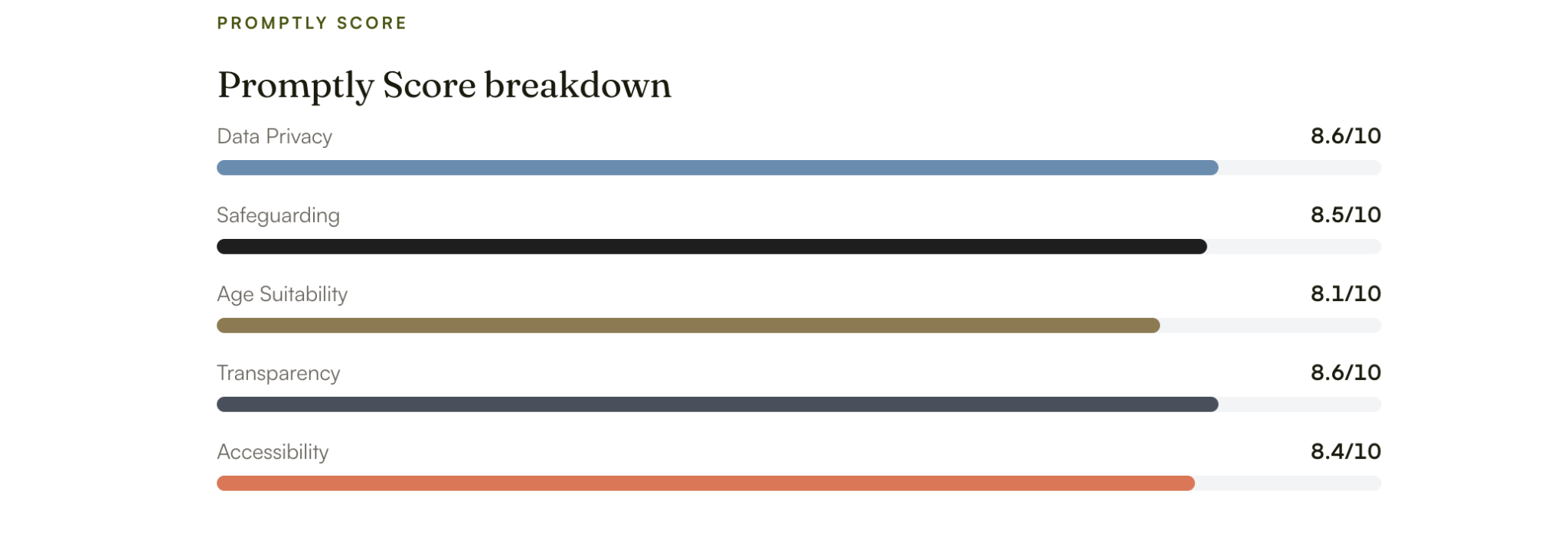
It doesn’t have many reviews online on independent review sites like Trustpilot, G2, or Google reviews. However, third-party reviewers have given it a decent score.
Pros
- Allows you to revise assignments before final grading is locked in
- Free base plan for teachers and students
- Institutional backing from Panorama Education
Cons
- STEM coverage is thin
- School and district pricing is not publicly listed
- Newly added AI-detection gives false positives
7. Edcafe (Assignment Grader)
Best for: Teachers who need an all-in-one AI grading software for the entire cycle.
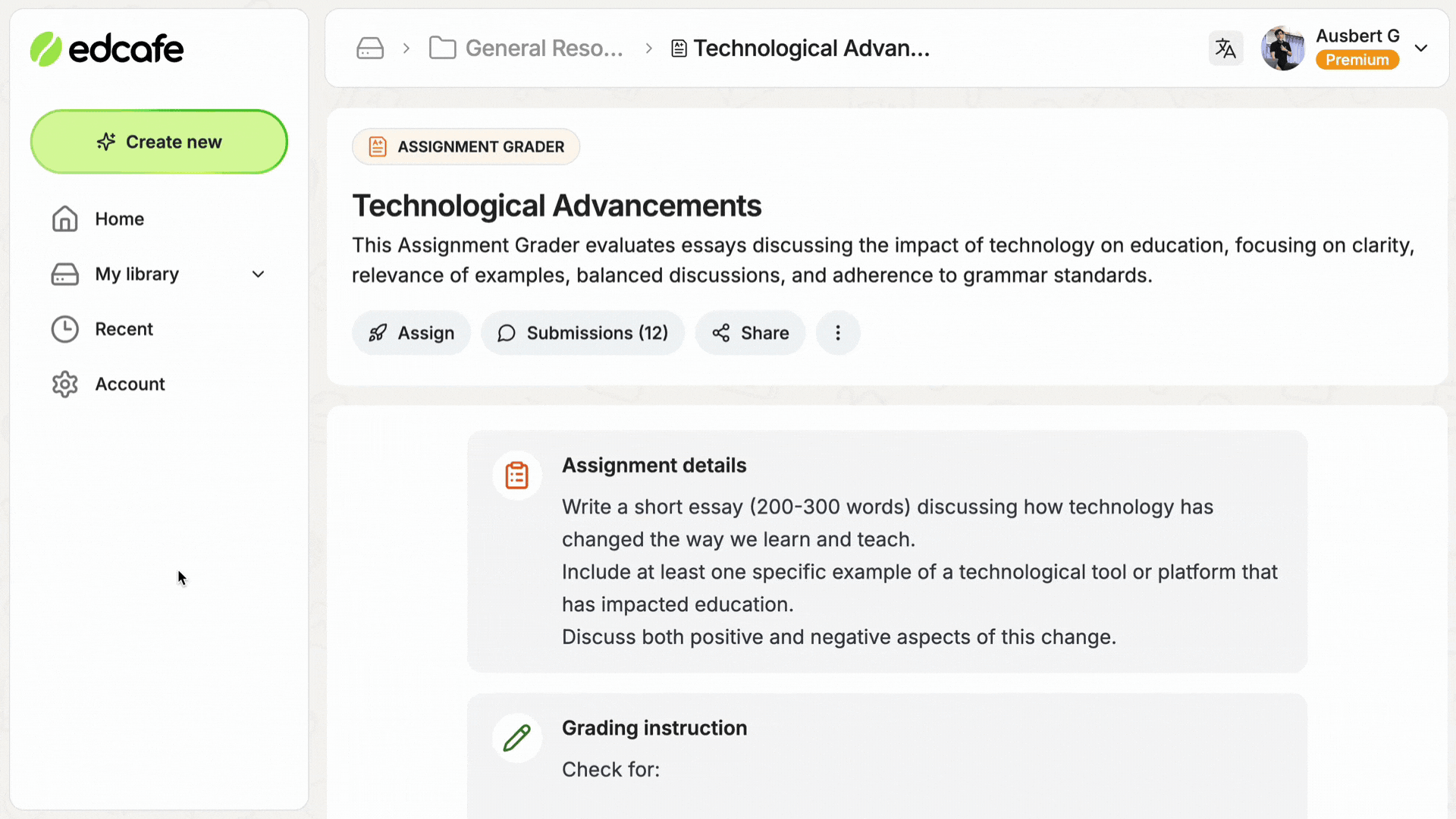
Edcafe AI is first and foremost a broad teaching toolkit. It helps teachers to generate lesson plans, create quizzes, slides, and flashcards, with the Assignment Grader as one feature inside its larger platform.
As a teacher, you can create your rubric and grading instructions, then share the assignments with students, even by a QR code or link. Then the tool provides the feedback, which you can edit later on.
Key Features
- All-in-one platform: You can assign, grade, edit, and even create lesson plans all under one platform.
- QR code and link sharing: Edcafe allows you to distribute assignments without requiring students to create separate accounts.
- Exportable records: You can download assignments, feedback, and grades for record-keeping purposes.
- Live analytics dashboard: Allows you to track performance in real-time.
Pricing
It comes with a free forever plan comprising 100 monthly AI generations and 3 assignment graders. Then paid options come at:
- Pro: $7.99/month for 1000 generations, 20 graders, and file uploads
- Premium: $14.99/month with higher limits
- School plans: Unlimited gragers and other features
What Users Say
Edcafe AI does not yet carry a substantial G2 or Capterra review based specifically on its grading feature.
Pros
- A usable free-forever tier
- No use of student data for training
- Assignments can be created, shared and graded in one platform
Cons
- AI grading is not a speciality, just a feature
- LMS integration is available for the School tier
- Limited reviews specifically for the grading feature
Get Your Hours Back By Having The Right Grading Tool By Your Side
No tool on this list does everything, and that's the point.
For teachers who spend most of their time grading written assignments, EssayGrader is the ideal pick, which allows them to grade essays quickly and apply their rubric in a meaningful manner.
Over 100,000 teachers already use it to turn hours of grading into minutes without changing how they teach.
Try EssayGrader free and see what it does with your next stack of essays.
FAQs
- What is AI grading, and how can it help teachers?
AI grading reads your students’ assignments using natural language processing (NLP), and then grades them based on a given rubric or list of criteria provided by you. The most notable benefit of AI grading for teachers can be attributed to its ability to save their valuable time. Even though these systems are capable of grading entirely automatically, teachers are still in control to review each piece of work they grade before finalizing the results.
- How accurate are AI grading tools?
The accuracy of AI grading software depends largely on what exactly you're trying to measure. Most platforms report that their AI systems have high levels of agreement with human scores, often well over 90% for work graded according to rubrics.
However, there’s also been independent, peer-reviewed academic work suggesting far less agreement between AI and humans on certain types of assessments.
- Do AI graders assess writing, math, or both?
The majority of tools listed here, like EssayGrader, Marking.ai, Class Companion, and GPTZero AI Grader, are focused on written responses and essays, though Gradescope distinguishes itself as being able to judge handwritten math, math/STEM problem sets, code, and bubble sheets alongside essays if math or STEM grading is a higher priority.
- What should I look for when choosing an AI grading tool?
There are various factors to look for when it comes to AI grading for teachers. Some of these are:
- Rubrics: You can start with your own rubric to see if they grade based on that instead of some generic model.
- Integration: Check out their LMS integrations. Does it work with the software your school is using?
- Prices: Are the prices clear, or are they hiding them behind “Contact sales”?
- Data: How do they handle your students’ personal data?
Nonetheless, it is highly advised that before making a commitment, you run one of your students’ papers through their system and evaluate the level of editing required on top of the feedback.
- Are AI grading tools compliant with student data privacy laws?
Yes, many of these tools even explicitly mention that they’re compliant with both FERPA (the federal law protecting student education records) and COPPA. However, regardless of what a marketing page claims, confirm your school or district has a signed Data Processing Agreement in place before uploading identifiable student work.
- Can AI graders enforce rubrics and scoring consistency?
AI grading tools can apply rubrics, as that's expected of them. Even grading software for teachers like EssayGrader AI comes with a library of 500+ pre-built rubrics. On top of that, it also allows you to personalize and apply your own rubric to grade assignments.
- Do AI grading tools detect plagiarism?
Some AI grading tools like EssayGrader AI do check for plagiarism as a standard practice without any manual intervention, while others don't. So, check specifically if flagging plagiarism is your main concern.

.jpeg)


.avif)
.avif)
%201.svg)